
What Is Data Management?
The process of gathering, organizing, storing, processing, safeguarding, and preserving information to ensure its continued utility and accessibility is known as data management. Through websites, mobile applications, online transactions, digital documents, customer records, and commercial activities, individuals and businesses generate vast volumes of data on a daily basis. But gathering data is just the first step. Important information may become hard to find, erroneous, duplicated, or accessible to unauthorized individuals in the absence of a well-organized system.
Thank you for reading this post, don't forget to subscribe!Consider a school that maintains thousands of student records in emails, spreadsheets, notebooks, and other folders. Finding the right information can take a long time when a teacher requires a student’s exam results. A well-designed data management system applies the proper access rights, arranges those records in a consistent location, and facilitates information retrieval. Hospitals, internet retailers, banks, academic institutions, and small enterprises are all subject to the same rule.
Why Is Data Management Important?
Because trustworthy information enables people to make better decisions, data management is important. While a teacher might examine student performance to determine which courses require more attention, a corporation can utilize sales statistics to discover popular products. In order for authorized professionals to access pertinent documents while delivering care, a healthcare institution can keep track of patient information. Poor-quality data can cause confusion, waste time, and result in preventable errors in all circumstances. Consistency is enhanced by well-managed data, which also makes it easier for users to locate the information they require without having to do repetitive tasks. Additionally, it facilitates the preparation of helpful reports, the identification of patterns, and the comparison of outcomes over time.
How Data Management Works
The lifespan of data management often starts with the creation or collection of information and continues through organization, storage, use, maintenance, sharing, archiving, and, when necessary, deletion. The type of information and the organization’s requirements determine the precise procedures. An online retailer might, for instance, gather orders from customers, verify addresses, record transaction information in a database, and examine sales to identify trends in customer behavior .A more straightforward approach would be for a student to gather research notes, arrange them into folders, store them on cloud storage, and go over them while working on an assignment. These examples show how information transforms from its initial state into a useful form for people.
Data Collection and Organization
In many data management workflows, gathering data is the first practical step. Forms, surveys, client orders, sensors, school records, research projects, and digital applications are some sources of information. It is crucial to obtain data that has a clear purpose and to refrain from collecting extraneous personal information. The data should be arranged into a standardized structure after it has been gathered. For instance, different columns might be used for names, contact data, order dates, and payment status in a spreadsheet that contains client information. Sorting records, filtering results, finding missing values, and creating reports are all made simpler by consistent formats, which eliminate the need to manually go over each entry.
Data Storage and Processing
Data storage is the act of storing information so that it can be accessed and utilized at a later time. Computer disks, external hard drives, network servers, databases, and cloud storage services are typical choices. Regarding cost, accessibility, security, and capacity, each choice has unique benefits. While a business might utilize a database to handle millions of client transactions, a student might store assignments on a laptop and have a backup in cloud storage. The amount of data, who has access to it, the speed at which it must be accessed, and the level of protection it needs all influence the choice of storage mechanism.
Data processing is the process of converting unprocessed information into a format that is more practical. Sorting records, computing totals, eliminating duplicate entries, merging data from several sources, or creating summaries are a few examples of this. To determine its best-selling items and determine its overall revenue, a store might, for instance, analyze a month’s worth of sales data.

7 Essential Types of Data Management
- Database Management
Organizing and preserving data in a structured system known as a database is known as database administration. Customer information, personnel records, product inventories, student data, and financial transactions can all be stored in databases. Authorized users can utilize built-in search facilities or queries to access specific records rather than looking through individual documents. Additionally, database management systems offer dependable updates, consistency, and access control .MySQL, PostgreSQL, Microsoft SQL Server, and SQLite are well-known examples. To learn how tables, records, fields, and connections function, beginners might begin with a straightforward database project. Anyone interested in data analysis, corporate administration, information technology, or software development can benefit from these ideas.
- Data Storage and Cloud Management
Data storage management is concerned with where data is stored, how it may be accessed, and how it is safeguarded against loss. Computer disks, external storage devices, and organizational servers are examples of traditional storage. Subject to the features and permissions of the service, cloud storage enables users to store files on distant infrastructure and access them via an internet connection. People can arrange documents, photos, and group projects with the aid of services like Dropbox, Google Drive, and Microsoft OneDrive. Cloud systems can be used by businesses to store bigger datasets and increase their capacity as needed. Instead of choosing a service solely on the basis of convenience, choosing a suitable solution necessitates taking storage limitations, privacy settings, recovery options, access controls, and costs into account.
- Data Quality Management
Information that is correct, comprehensive, consistent, up to date, and appropriate for its intended use is guaranty by data quality management. Even when a company employs cutting-edge technology, inaccurate records can still lead to issues. For example, if a customer’s address is out-of-date or incomplete, a delivery company can send an order to the incorrect place. Data quality processes use validation criteria, regular reviews, duplicate detection, and corrective procedures to find such problems. By utilizing consistent date formats, proofreading their spelling, explicitly labeling any missing information, and eliminating needless repeat inputs, beginners can enhance the quality of their data. Planning, reporting, and automated decision-making are all strengthened by high-quality data.
- Data Governance and Security
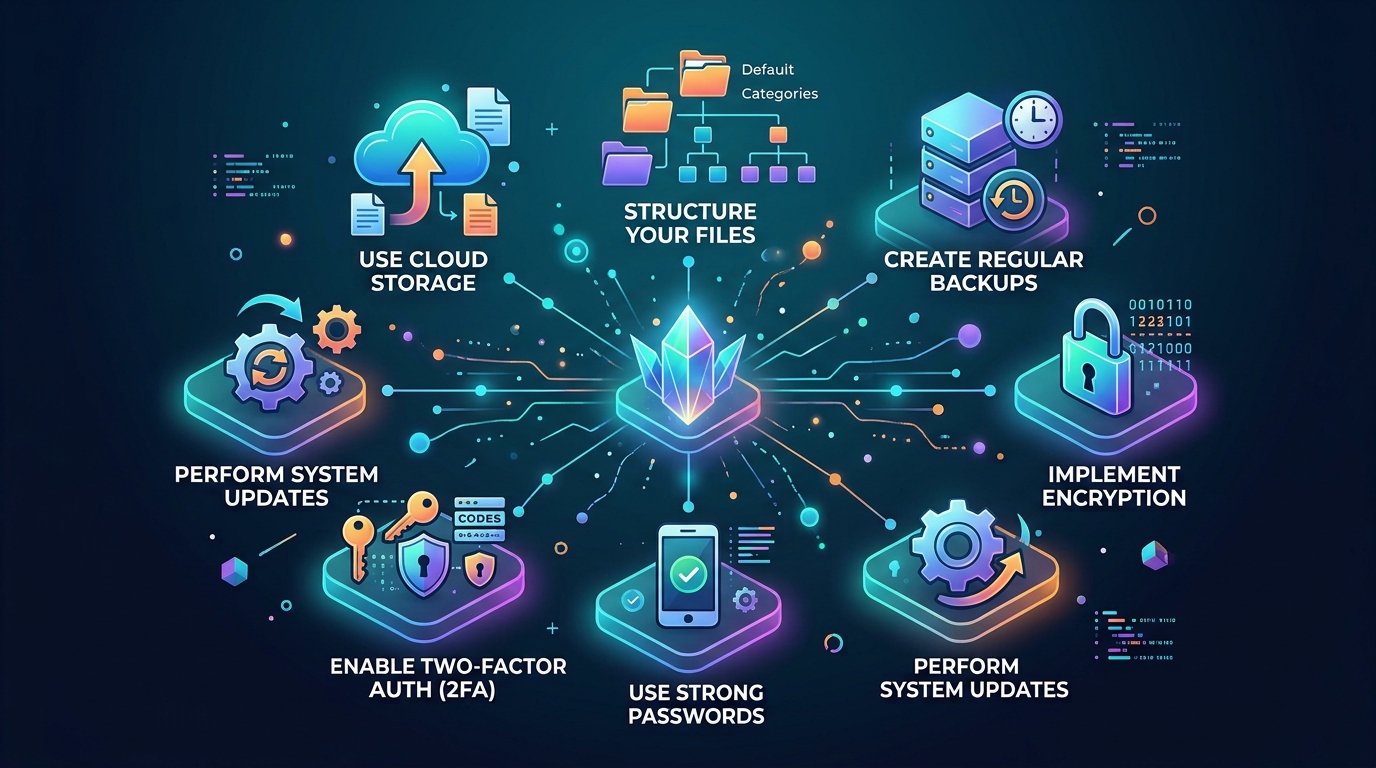
The norms, obligations, and guidelines that govern the gathering, access, sharing, and preservation of data are established by data governance. It aids in determining who is the owner of specific records, who has the ability to alter them, and how sensitive data should be managed. Protecting data from theft, manipulation, destruction, and unauthorized access is the primary goal of data security. Strong passwords, encryption, access rights, multifactor authentication, and safe backups are common security measures. These procedures are particularly crucial when data contains private, sensitive business, financial, or educational information. Beginners should realize that keeping a file in a handy place is not sufficient; they also need to think about who can access it and what would happen if it were lost or discovered.
- Data Integration Management
Data integration unifies information from several sources so that it may be applied consistently. For instance, a company may store sales transactions in one application, customer information in another, and inventory data in a third. By connecting these records, integration helps produce a more comprehensive view of corporate activity. As long as the systems employ compatible formats and suitable matching rules, this can lessen tedious manual labor and enhance reporting. In research and education, data integration is also useful when comparing information from several datasets. However, because mismatched names, formats, or identifiers can result in inaccurate matches, merging records necessitates thorough validation.
- Big Data Management
Big data management deals with extremely huge, complicated, or quickly created datasets that may be difficult for conventional methods to handle effectively. Website traffic, sensor readings, online transactions, scientific observations, and data produced by linked devices are some examples of these datasets. Organizations may store, handle, and analyze such data at scale with the use of specialized platforms. Workloads that surpass the realistic capabilities of a single machine can be supported by technologies like distributed data-processing systems and Apache Spark. Although it’s not necessary for beginners to become proficient in these technologies right away, knowing the fundamentals is helpful because larger datasets frequently call for new storage layouts, processing techniques, and quality standards. Asking insightful questions and deriving trustworthy conclusions—rather than merely gathering as much data as possible—is where big data truly shines.

- Data Lifecycle and Records Management
Information production, active usage, long-term retention, archiving, and final destruction are all included in data lifecycle management. Depending on their intended use, applicable regulations, and organizational policy, different records may need to be kept for varying amounts of time. For instance, a company may have to keep some financial records while removing copies of client data that aren’t needed. A student may delete temporary files that are no longer needed and archive finished assignments in folders with clear names. Finding crucial papers and determining which versions are current are made simpler by records management. Additionally, it helps businesses avoid storing sensitive data permanently without a good reason and lessens clutter.
10 Useful Data Management Tools
Information can be arranged, stored, cleaned, safeguarded, and analyzed with the aid of data management tools. The quantity of data, the user’s technical expertise, the budget, and the necessary degree of security all influence which tool is best. A business with a sizable client database will require a different approach than a novice handling school assignments. While some programs handle databases, analytics, or cloud infrastructure, others are made for spreadsheets and teamwork. Ten helpful examples and their typical uses are provided here.
Tool
Main purpose
Best suited for
Microsoft Excel
Spreadsheets, calculations, sorting, and analysis
Students and small businesse
Google Sheets
Online spreadsheets and collaboration
Teams and beginners
MySQL
Relational database management
Websites and applications
PostgreSQL
Advanced relational database management
Developers and organizations
Microsoft Access
Creating and managing desktop databases
Small database projects
Microsoft SQL Server
Managing relational data and business workloads
Organizations
Google Drive
Cloud file storage and collaboration
Students and professionals
Microsoft OneDrive
File storage and synchronization
Individuals and businesses
Tableau
Data visualization and reporting
Analysts and decision-makers
Apache Spark
Large-scale data processing
Data engineering and analytics teams
Since these instruments have varied functions, they shouldn’t all be viewed as straight substitutes. For modest datasets, straightforward computations, and structured tables, Google Sheets and Excel are useful. While SQL Server serves corporate applications and reporting requirements, MySQL and PostgreSQL are intended for database workloads. Instead than taking the place of a complete database, Google Drive and OneDrive concentrate on files. Large-scale processing is supported by Apache Spark, while Tableau assists in converting data into dashboards and infographics. Determine your primary task, test the features offered, and consider security, compatibility, and cost before selecting a tool. Before committing to a platform or making a purchase, review the official documentation as product features and license may change.
Benefits of Effective Data Management
Benefits from efficient data management go beyond just keeping information organized. It helps people make better-informed decisions, save time, minimize errors, and safeguard important information. Users spend more time accomplishing important activities and less time looking for papers when information is correctly arranged. Companies are able to compare sales, comprehend client wants, and spot operational issues. Researchers can keep data that supports precise analysis, and schools can handle student records more reliably. Organizations of all sizes can take advantage of these advantages, but the methods and equipment needed will differ.

Enhanced cooperation is another significant advantage. Authorized team members can exchange information without constantly requesting that colleagues resend documents or clarify contradicting data when they maintain consistent records. Because backups and recovery strategies enable firms to react to unintentional deletion, device failure, or other disturbances, good data management also supports business continuity. While data quality checks aid in preventing decisions based on inaccurate information, security controls lessen the possibility of unwanted access .Reliable data is especially crucial for companies implementing analytics or artificial intelligence since subpar inputs might yield deceptive outcomes. IBM’s most recent data management guidelines emphasize how crucial it is to make data reliable, easily available, and prepared for AI and business analytics applications.
Common Data Management Challenges
Despite its benefits, data management can be challenging when information is gathered from several sources or expands more quickly than a company can handle. Poor data quality is one prevalent issue. Reports may be untrustworthy due to duplicate entries, missing values, out-of-date contact information, and irregular forms. Data fragmentation, which happens when information is dispersed among disparate applications, spreadsheets, and storage sites, is another issue. Users can find it difficult to locate the most recent version of a document or learn that disparate departments are utilizing different numbers. These issues can be lessened with the use of suitable integration techniques, regular inspections, and clear standards.
Challenges include expense, complexity, and security. Sensitive data must be safeguarded by organizations while allowing authorized people to access it as needed. While a system with inadequate permissions may reveal private documents, one that is overly restrictive may impede legitimate work. Subscription fees, training needs, and compatibility issues could be introduced by cloud services and specialist software. Retaining data can also be challenging: Maintaining everything indefinitely increases danger and clutter, but erasing crucial documents too soon might lead to major issues. Understanding the needs of the company, delegating tasks, recording processes, and routinely evaluating the system are the first steps toward a workable solution. By keeping dependable backups, restricting file access, and arranging folders, novices can use the same strategy on a smaller scale.
Best Practices for Managing Data
The best data management strategy is one that users can follow consistently. Begin by deciding what information you need, why you need it, and who should have access. Create clear categories, use consistent file names, and choose suitable formats for dates, amounts, and other values. When working with spreadsheets, keep column headings meaningful and avoid mixing unrelated types of information in the same field. For a database, plan its tables and relationships before entering large amounts of data. These simple decisions make information easier to search, compare, update, and share without introducing unnecessary complexity.
Data Management Examples in Everyday Life
Data management is not just for big businesses or computer specialists. It is used by people whenever they keep records, arrange digital data, or base choices on information that has been kept. Think about a student who maintains research references in a spreadsheet, backs up critical documents online, and stores homework in folders categorized by subject and semester. This straightforward method lowers the possibility of losing finished work and makes it simpler to locate materials prior to exams. In a similar vein, a family might keep a household budget by keeping track of spending, classifying items, and examining monthly totals. In both cases, well-organized data aids individuals in comprehending their actions and making plans for the future.
The Future of Data Management
Cloud computing, automation, artificial intelligence, and the increasing requirement for information security will all have an impact on data management in the future. Systems that can identify duplicate information, indicate anomalous values, automate routine processing, and assist users in finding helpful patterns are becoming more and more sought after by organizations. AI-powered tools could help with document classification, exploring vast amounts of data, and spotting possible problems with quality .Automated systems still need human supervision, though, particularly when sensitive data is involved or a choice could have dire repercussions. Instead of believing that sophisticated technology ensures accuracy, companies must continue to validate information because inaccurate data might result in inaccurate suggestions.
Conclusion
Because it enables people and organizations to efficiently gather, store, process, organize, and safeguard information, data management is a crucial component of contemporary technology. From basic spreadsheets to sophisticated databases and cloud platforms, the appropriate techniques may boost decision-making, increase productivity, decrease errors, and foster teamwork. Knowing the various forms of data management also makes it easier for novices to identify the right tools for specific jobs.
Frequently Asked Questions (FAQs)
- What is data management in simple words?
Data management is the process of collecting, organizing, storing, processing, and protecting information so that people can find and use it when needed. It can involve something as simple as organizing personal files or as advanced as maintaining a large business database.
- What are the main types of data management?
The main types include database management, data storage management, data quality management, data governance, data integration, big data management, and data lifecycle management. Each type supports a different aspect of handling information effectively.
- Which data management tools are best for beginners?
Microsoft Excel and Google Sheets are useful starting points for organizing information in spreadsheets. Google Drive and Microsoft OneDrive help manage files, while Microsoft Access can introduce beginners to database concepts. The best option depends on the task and the amount of data involved.
- Why is data management important in information technology?
Data management helps IT systems maintain accurate, organized, secure, and accessible information. It supports reliable applications, efficient business operations, data analysis, system recovery, and informed decision-making.
- How can I improve my data management skills?
Start by learning spreadsheet basics, organizing files into clear folders, checking data for errors, and maintaining backups. Next, explore database fundamentals, basic SQL, data visualization, and information security. Practicing with small projects can help you build skills before working with larger datasets.